Enjoy quick and easy access to Tower.bet on iOS, Android, Windows, and MacOS.
Launch games and place bets without waiting.
Get notifications directly on your device.
Open Tower.bet straight from your home screen.
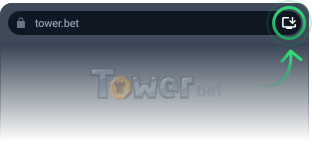
Look for the Install icon on the right side of the Chrome address bar.
Click it and confirm installation.
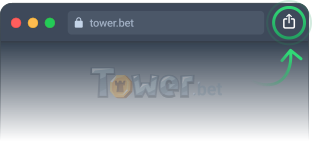
Look for the Share icon on the right side of the Safari address bar
Select Add to Dock from the menu and confirm.
You can install it using Chrome (Windows, Mac, Android), Safari (iOS), or Samsung Internet (Android).
Just open Tower.bet, tap the three dots in the corner, choose Add to Home Screen, and hit Add — done!
Tap the three lines menu, select Add page to Home Screen, and confirm. That’s it.
Tap Share icon in the bottom of the browser app and navigate to Add page to Home Screen, and confirm.
Open Tower.bet in Safari, tap the Share icon, pick Add to Home Screen, and confirm.
Look for the little install icon (a computer with an arrow) in the address bar. Click it, confirm, and you're good to go.
Same as Windows — open Tower.bet, click the install icon in the address bar, and confirm.
Open Tower.bet in Safari, tap the Share icon, pick Add to Dock, and confirm.